Make it
Press REC, name the tape and pick its length. Every song shows how long it runs, and songs too long for the room left are crossed out. When a side is full, it’s full.
 Own Your Media Club
Open Flipside
Powered by myStereo
Make someone a mixtape. Pick a C60 or a C90, fill Side A and Side B with songs you love, write the label by hand, and send it to a friend.
Millions of songs are everywhere. Ninety minutes makes you choose, and that’s the whole point.
How it works
Press REC, name the tape and pick its length. Every song shows how long it runs, and songs too long for the room left are crossed out. When a side is full, it’s full.
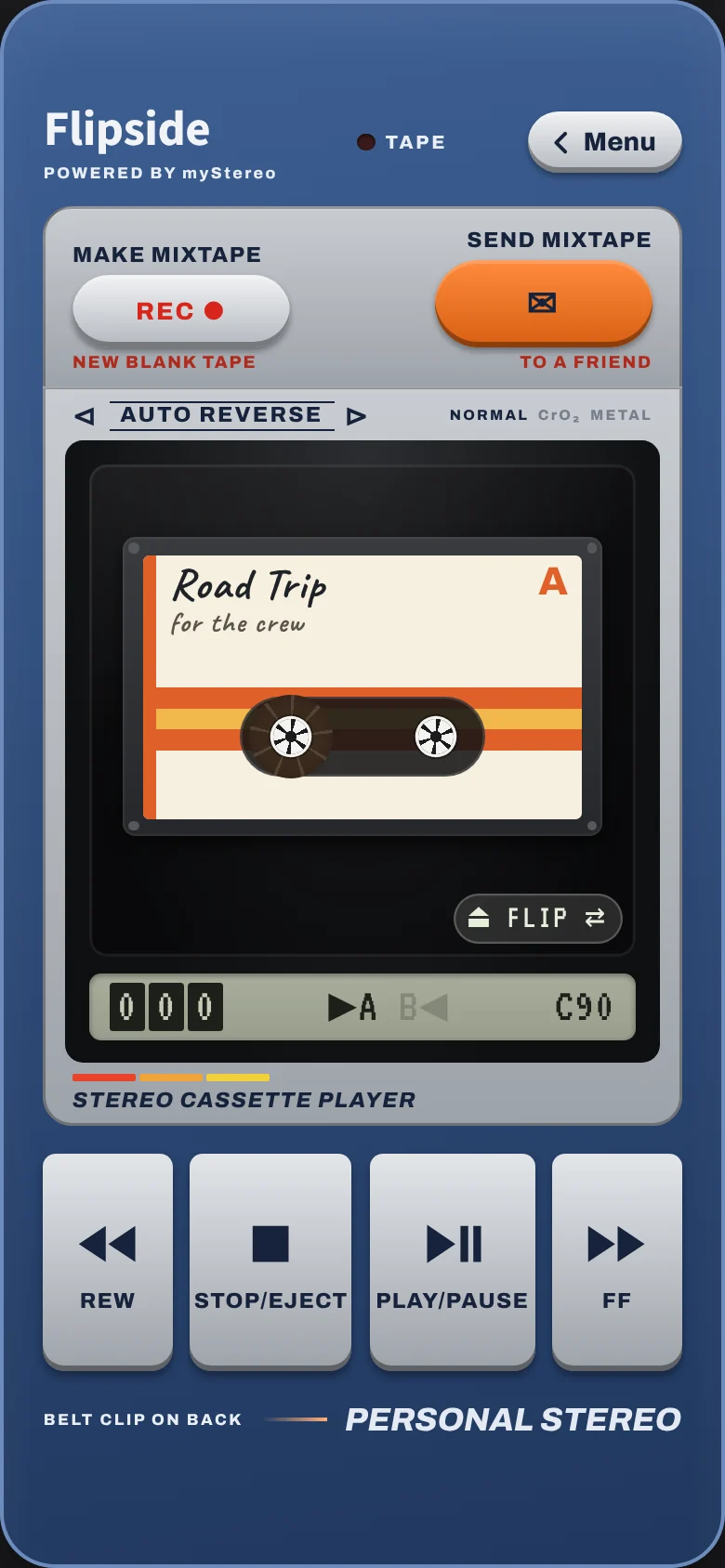
A cassette deck with real buttons. PLAY/PAUSE stays down while it plays, REW and FF wind with the sound of the tape, and FLIP turns it over. No shuffle, no skipping.
Send Mixtape lists the people you share your Plex server with. They get a picture of the tape case and a link that opens it. The songs stay a surprise until they’ve heard the whole thing, unless you choose to show them.
Make it yours
Label Maker
Sixteen music themes, from Punk and Jazz to Chiptune, dress a tape in one press. Or pick the paper, the pen, the ink, the stripe and the shell yourself: clear, smoke, neon or gold. Stuck? Press Surprise Me.
Search any song
Search for any song by title and artist, not just your library. If it’s already in your Plex library, it fills right in. If it isn’t yet, it holds its place on the tape with links to buy it.
Deck colors
Night Black, Metallic Blue, Pearl & Teal, or the rugged Sport line in seven colors. Turn the player over and the menu side matches, screen and all. On a computer, Desktop Mode wears it too.
Learn the craft
Plan a tape on the Sketch Pad before you press REC: fill a crate with maybe-songs, pick a story arc, put the keepers in order, and let the Mixtape Coach point out the rules of thumb. A great way to learn how it’s done.
Songs you don’t own yet
Put a song on a tape before you own it. It holds its spot and its time, with links to buy it on Bandcamp, Qobuz or the iTunes Store. Add the file to your Plex music and it fills in on the tape by itself.
Powered by myStereo
Flipside plays from your own Plex server. Tapes save to Plex, so they follow you to every device and show up in myStereo too. No Plex yet? Try it with the demo music first.
A Plex Media Server with your music, yours or one a friend shares with you. An iPhone (Safari), an Android phone (Chrome) or a computer. Nothing to download from an app store.
myStereo does it all: music, videos, games, faceplates. Flipside does one thing, mixtapes, with a deck that’s all buttons. Press Menu to turn it over for your music, tapes and settings.
Turn on Analog Mode and every tape lives on your phone, so it plays anywhere: on a plane, up north, in the basement. Recording copies each song to the phone. Dub your tapes on Wi-Fi first.
Yes. iPhone: open it in Safari, tap Share, then Add to Home Screen. Android: open it in Chrome, tap the ⋮ menu, then Add to Home screen (or Install app). Either way it gets its own cassette icon and opens full screen.
Troubleshooting
Phones only start sound after a tap. Press PLAY again, and check the volume and the iPhone ring switch.
Make sure your server is on with Remote Access turned on, then go to Settings › Music Sources › Plex › Reconnect.
They hear it from your server, so share your Plex library with them first, then send the tape again.
Choose Mixtapes › Sync with Plex on both devices. They need to be on the same Plex server.
Back steps out of menus like the MENU key. On the deck with nothing open, it leaves the app.
Remove Flipside from your Home Screen and add it again. Your sign-in and tapes stay.